


Table of Contents
Parenting support has moved onto phones because phones are close by when a fever spikes, a baby will not sleep, or a school form disappears under the mail. That convenience matters. But family health support works better when digital tools sit beside paper reminders, trusted people, and local health programs instead of trying to replace them.
How Parenting Support Moved Onto Phones
Before smartphones, parenting support had a different sound: a public health nurse leaving a voicemail, a clinic handout folded into a diaper bag, a school newsletter taped to the refrigerator, a neighbor knocking to ask whether the baby was feeding better.
Families kept phone lists near the landline. They wrote medicine times on envelopes. A grandparent might carry the school pickup routine in memory because nobody had a shared calendar to check. That system was imperfect, but it had one quiet strength: support did not live in one device.
Smartphones changed the pace. Around the early 2010s, as smartphone ownership became common among younger adults, parenting apps began to feel like the natural place for feeding logs, symptom checkers, growth tracking, vaccination reminders, sleep timers, and searchable overnight advice. A parent could open an app in the middle of the night and find a checklist before the pediatric office opened.
That access can calm a household.
Layer 1: Digital

The problem begins when the phone becomes the whole support system. A parent switches phones and loses a couple of years of feeding and dose history because the app stored records locally without a simple export. The fridge sheet and a backup caregiver’s memory become the only surviving record. In a household where one caregiver speaks mostly with a grandparent rather than through the parent’s phone, an app-only reminder system can quietly exclude the person doing half the caregiving.
Summary: Digital tools are useful as the newest layer of parenting support, not as a replacement for shared problem-solving, practical access, and human connection.
App-Only Support Compared With Hybrid Parenting Support
The same app can help with one parenting need and fall short on the next. A calendar reminder for a vaccine visit is simple. A symptom decision at midnight, with a tired parent and a wheezing child, requires more than a confident screen.
This table uses the parenting need as the starting point. That keeps the question practical: What job are we asking the tool to do?
Comparison of app-only parenting support and hybrid support| Parenting need | What apps do well | App-only risk | Tangible or community-based complement |
|---|---|---|---|
| Medication and appointment reminders | Send timed alerts, repeat reminders, and keep dates in one portable place. | Notifications can be missed, silenced, or trapped on one caregiver’s phone. | Printed medication schedule, shared wall calendar, pharmacy label review, and a second caregiver check-in. |
| Infant feeding and sleep tracking | Record times, amounts, patterns, and notes when days blur together. | Tracking can become stressful when every short nap feels like a problem to solve. | Simple paper feeding notes for grandparents, lactation support when needed, and routine review at well-child visits. |
| Preventive care education | Offer checklists, reminders, and plain-language reading before appointments. | General advice may not fit culture, food access, housing, transportation, or family schedule. | Clinic handouts, wellness education sessions, school-based resources, and local family health programs. |
| Postpartum or caregiver stress | Prompt mood check-ins and help a caregiver notice patterns over time. | A screen may miss tone, isolation, fear, or the way a parent says, “I’m fine” when they are not. | Trusted nurses, community health workers, parent groups, faith or school-based support, and direct outreach from people who know the family. |
| Urgent symptom decisions | Help organize observations such as fever timing, fluid intake, and visible symptoms. | Generalized guidance can create false reassurance or unnecessary panic. | Call the pediatric office, nurse line, urgent care, or emergency services based on the child’s condition and local instructions. |
| Limited data plans, shared devices, or unstable internet | Work well when the family has reliable access, storage, and privacy. | Support disappears when data runs out, a phone is shared, a password is lost, or internet access drops. | Printed action plans, community resource desks, school or library access points, and checking local service through the FCC National Broadband Map. |
Note: This comparison assumes a family can choose and control its tools. When one person controls the shared phone, even a strong app feature may be unavailable to another caregiver.
Where Digital Parenting Tools Still Help
Apps shine when they reduce memory burden. Parenting already asks people to remember appointment times, medicine intervals, school forms, feeding patterns, allergy notes, and which child needs new shoes. A good digital tool holds the repeatable details so the parent can focus on the child in front of them.
The strongest uses are modest: recurring reminders, structured logs, basic preparation checklists, saved questions before appointments, and family routine organization. One app can remind a parent about a vaccine visit. Another can store questions for the pediatrician. The best setup usually gives one app one job rather than scattering family health details across several platforms.
Here is a concrete example. A toddler develops a fever after dinner. The parent uses an app to log each temperature reading and each medicine dose with the clock time. At the pediatric visit the next morning, the parent can hand over clean notes instead of guessing from a sleepless night.
That is a healthy use of technology: the app organizes observations, and the clinician interprets them.
Quick Tip: Choose the digital tool after naming the task. “We need appointment reminders” leads to a cleaner setup than “We need a parenting app.”
Symptom checkers deserve a firmer boundary. They can help a parent collect details, but they should not drive urgent-symptom, medication, or diagnosis decisions. When the question is safety, the next step belongs with qualified medical care, not the most polished screen.
Pros and Cons of Parenting Health Apps
Parents do not need a lecture about screen time when they are trying to keep a household running. They need a clear view of what the tool gives and what it quietly asks for in return.
✓ Pros
- Convenience during late hours, especially when a parent needs a checklist or reminder after offices are closed.
- Portable records for feeding notes, fever timing, medication doses, appointments, and questions.
- Reminders for preventive care visits, medication schedules, school forms, or follow-up tasks.
- Easier sharing of nonurgent notes with another caregiver when both people can access the same information.
- Prompts that help parents prepare better questions before a clinic or wellness education visit.
✗ Cons
- Isolation when parents stop asking people for help because the app appears to have an answer for everything.
- Exclusion of families without reliable internet, private devices, enough storage, or consistent data access.
- Alert fatigue when several notification-heavy apps compete for attention.
- Privacy concerns when sensitive family health details spread across multiple platforms.
- Overconfidence in generalized guidance that does not know the child, the home, or the family’s constraints.
- Difficulty interpreting caregiver stress, culture, family dynamics, housing instability, or transportation barriers.
Alert fatigue tends to build when parents stack too many notification-heavy tools. A single reminder app rarely creates the same tune-out effect as three or four apps buzzing through dinner, bath, and bedtime.
Why Paper, People, and Place Still Matter
Hybrid support works because it creates redundancy. If the phone dies, the paper still speaks. If the printed sheet feels confusing, a person can interpret it. If a family needs more than advice, a local place can connect them to resources.
Paper Keeps the Plan Visible
A printed medication schedule on the refrigerator is not old-fashioned. It is accessible. A grandparent covering care two days a week may reliably use a printed routine and call list instead of a parent’s password-protected app.
Useful paper tools include an emergency contact card, vaccine visit checklist, feeding notes, medication instructions, allergy list, preferred urgent care location, and a refrigerator-ready action plan. The format does not need to be beautiful. It needs to be current, readable, and easy to find while a child is crying.
Keep in mind that a printed sheet only helps if the family updates it. When a phone number, medication, clinic, or caregiver schedule changes, the fridge copy needs the same update as the app.
People Notice What Apps Miss
A trusted community health worker may hear hesitation in a parent’s voice. A nurse may notice that a caregiver understands the medicine label but cannot get to the pharmacy before closing. A parent group may give someone permission to say, “I am overwhelmed,” without turning that sentence into a crisis.
People also carry cultural context. They know who cooks in the household, which school sends forms home on paper, which neighbor can help with pickup, and which family member should receive the routine in plain language rather than through an app login.
Place Turns Advice Into Access
Families often need a physical doorway: a clinic desk, school office, library, faith community, food pantry, community center, or preventive care program. Place matters because support becomes easier to use when it sits where families already go.
That is why a strong family health plan should not depend on perfect internet, perfect memory, or one perfect caregiver. It should make the next right action easy to find.
About the Review Team
This review was prepared by agfha’s family health education and community support team, which develops practical preventive care resources for parents, caregivers, and local families.
The article is educational and focuses on support design: how families can combine digital reminders, paper tools, and human backup so routine care does not sit on one overloaded parent’s phone.
Key Takeaway: Build a Three-Layer Parenting Support Plan
Parenting apps work best as a convenience layer. The foundation should be broader: one digital layer, one paper layer, and one human layer.
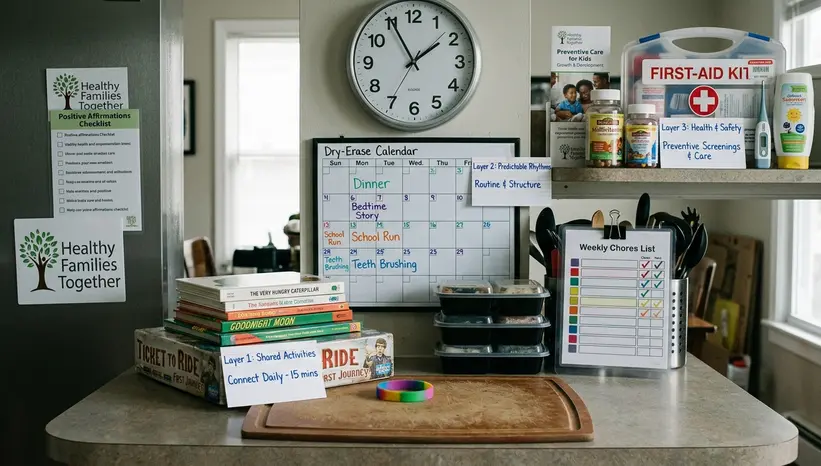
- Choose one app or calendar for appointments, reminders, and nonurgent tracking.
- Use it for repeatable tasks: vaccine dates, follow-up visits, medication reminder times, and questions to ask at appointments.
- Avoid storing the same family health detail in several places unless one of them is a clear backup.
Layer 2: Paper
- Post one care sheet where caregivers will actually see it.
- Include the pediatrician number, pharmacy number, emergency contacts, medication instructions, allergies, preferred urgent care location, and daily routine notes.
- Keep a medicine log beside the thermometer so fever readings and doses stay together.
Layer 3: Human
- Name two backup contacts who have agreed to help.
- Show them where the care sheet lives.
- Tell them when the plan changes, especially after a clinic visit or medication update.
Copy this setup for a toddler with upcoming vaccines: put the vaccine appointment dates in the phone calendar with reminders one week before and the morning of the visit. Tape a one-page care sheet to the refrigerator with the pediatrician number, pharmacy number, allergy notes, daily nap routine, preferred urgent care location, and both parent phone numbers. Place a paper medicine log beside the thermometer, with columns for date, time, temperature, medicine, dose, and initials. Ask one neighbor and one aunt to serve as backup contacts, then text both of them a photo of the fridge sheet and tell them the paper copy is the source of truth. After each clinic visit, update the phone calendar first, rewrite the fridge sheet second, and check the medicine log before putting the thermometer away.










Add a Comment